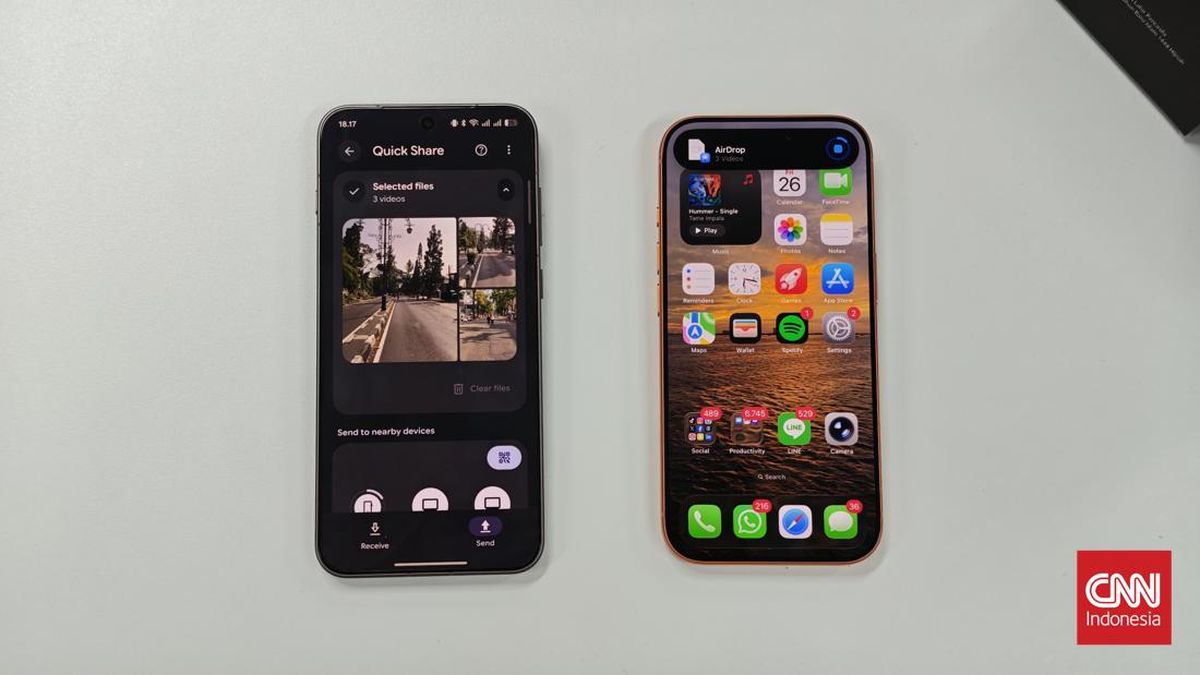
Android users can now effortlessly share photos, videos, and various files directly with iPhones using Google’s Quick Share feature, which has been integrated with Apple’s proprietary AirDrop technology, effectively dismantling a significant barrier between the two fiercely competitive mobile operating systems without the need for cumbersome third-party applications. This groundbreaking interoperability marks a pivotal moment in mobile technology, promising a vastly improved user experience for billions worldwide who routinely interact across the Android and iOS divide.
A Long-Awaited Chronology of Interoperability
The journey towards this seamless cross-platform sharing began with Google’s persistent efforts to enhance its own proximity-based sharing capabilities. Previously known as "Nearby Share," Google first introduced this feature in August 2020, aiming to replicate the convenience of AirDrop within the Android ecosystem and across Chromebooks. While effective for Android-to-Android transfers, the absence of a direct bridge to iOS left a considerable void for users accustomed to mixed-device environments.
The true breakthrough arrived with the strategic integration of Quick Share with Apple’s AirDrop protocol. This feature was initially rolled out in November 2025, making its debut on Google’s flagship Pixel 10 series devices. Following a successful pilot and refinement phase, Google systematically expanded the availability of this integrated Quick Share functionality to a broader array of Android devices from various manufacturers starting in early 2026. This staggered rollout ensured stability and compatibility across the fragmented Android landscape, paving the way for a more universal adoption. The move was widely anticipated by industry observers who had long advocated for greater interoperability between the two dominant mobile platforms. Prior to this, users were often relegated to less efficient methods such as email attachments, cloud storage services, or messaging apps, each introducing friction, data compression, or privacy concerns.
Technical Mechanics: A Unified Sharing Experience
The operational mechanism of the integrated Quick Share is remarkably similar to the established AirDrop experience. For a successful transfer, both the sending Android device and the receiving iPhone must be within close proximity, typically within Bluetooth range. Furthermore, both devices require their Wi-Fi capabilities to be active, as the actual data transfer leverages a direct Wi-Fi peer-to-peer connection for speed and efficiency, while Bluetooth is primarily used for device discovery and initial handshake. Crucially, these transfers occur locally, meaning files do not traverse the internet or cloud servers, ensuring a higher degree of privacy and often faster transfer speeds, especially for large files.
For Android users looking to send files to an iPhone, the process is streamlined:
- Open the file (photo, video, document) you wish to share on your Android device.
- Tap the ‘Share’ icon, which typically appears as a three-dot connection or an arrow.
- From the sharing options, select ‘Quick Share’.
- Your Android device will begin scanning for nearby compatible devices. If an iPhone with AirDrop enabled (set to ‘Everyone’ or ‘Contacts Only’ if the Android user is in its contacts) is detected, it will appear in the list.
- Select the iPhone’s name from the list.
- The iPhone user will receive a notification prompting them to ‘Accept’ or ‘Decline’ the incoming file. Once accepted, the transfer proceeds.
Notably, Samsung Galaxy device users need an additional step: ensure the "Share with Apple devices" option within the Quick Share settings is activated prior to initiating a transfer. This setting ensures the necessary compatibility layer is active for seamless communication with AirDrop.
Conversely, for iPhone users sending files to an Android device equipped with the integrated Quick Share:
- Open the file on your iPhone.
- Tap the ‘Share’ icon.
- Select ‘AirDrop’.
- Your iPhone will scan for nearby devices. The Android device (with Quick Share active and visibility set appropriately, e.g., ‘Everyone’) will appear in the AirDrop recipient list.
- Select the Android device’s name.
- The Android user will receive a prompt to ‘Accept’ or ‘Decline’ the file. Upon acceptance, the transfer completes.
For Android devices that are not yet hardware-compatible with this direct AirDrop integration, Google has provided an alternative method via QR code. This method is particularly useful for older devices or those awaiting firmware updates.
- On the Android device, open the file and select ‘Quick Share’.
- Choose the option to ‘Share via QR code’.
- A QR code will be generated on the Android screen.
- The iPhone user can then use their camera to scan this QR code, which will direct them to a web link where they can download the shared file.
It is important to note that this QR code method relies on an active internet connection and does not operate locally like the direct Quick Share-AirDrop integration. While functional, it introduces an extra step and dependency on network connectivity.
The Vast Landscape of Mobile Market Share and Historical Context
This integration is particularly impactful given the colossal market penetration of both Android and iOS globally. According to recent data from sources like Statista, Android consistently holds approximately 70-75% of the global smartphone operating system market share, while iOS commands the remaining 25-30%. This means that billions of users regularly interact across these two platforms, whether it’s sharing photos from a family gathering, collaborating on work documents, or simply exchanging memes with friends. The historical friction in cross-platform file sharing has been a persistent source of frustration, often referred to as the "digital divide" between the two ecosystems.
For years, the exchange of files between an Android phone and an iPhone necessitated workarounds. Users resorted to emailing files, uploading them to cloud storage services like Google Drive or Dropbox and then sharing a link, or using third-party messaging applications that often compressed media quality. Each of these methods came with its own set of inconveniences, including slower transfer times, potential data charges, quality degradation, and reliance on internet connectivity. The most direct method, Bluetooth, was notoriously slow and often unreliable for anything beyond small files. This created a fragmented user experience, compelling many to choose one ecosystem over the other based on their primary social and professional circles.
Apple, historically known for its "walled garden" approach, meticulously controls its hardware and software ecosystem, prioritizing a seamless, integrated experience primarily within its own products. While this has fostered a strong brand loyalty and user experience, it has often come at the expense of interoperability with non-Apple devices. Google, on the other hand, champions a more open ecosystem, though it too has sought to create cohesive experiences within its own Android framework. The decision to integrate AirDrop functionality into Quick Share represents a significant softening of these traditional stances, particularly from Apple’s perspective, enabling a more fluid exchange that ultimately benefits users on both sides. This move suggests a pragmatic recognition that users exist in a mixed-device world and that enhancing interoperability can lead to greater user satisfaction and reduce pain points, rather than diminish brand loyalty.
Industry Reactions and Broader Implications
While neither Google nor Apple have issued explicit joint statements detailing the specifics of their collaboration on this integration, industry analysts and observers have inferred a calculated move benefiting both parties.
From Google’s perspective, this initiative aligns with its broader strategy of making Android a more user-friendly and universally connected platform. A hypothetical statement from a Google spokesperson might emphasize their commitment to "breaking down digital barriers" and "empowering users with seamless connectivity, regardless of their device choice." This enhances Android’s appeal by solving a long-standing user pain point and positioning Google as a proponent of open standards and enhanced user experience.
Apple’s implicit cooperation, or at least non-resistance, to this integration is more surprising, given its historical stance. Analysts suggest that Apple recognized the growing demand for frictionless sharing in a world where users frequently interact with both Android and iOS devices. By allowing Quick Share to tap into the AirDrop protocol, Apple enables its users to maintain their seamless AirDrop experience even when interacting with Android devices, without having to resort to less secure or less efficient third-party solutions. This could be seen as a strategic move to improve the overall user experience for iPhone owners, making their devices more versatile and reducing potential frustrations when sharing with friends or colleagues who use Android. It enhances the perceived value of the iPhone ecosystem without compromising its core security or exclusivity. A hypothetical statement from Apple might focus on "enhancing the connectivity options for our users while maintaining our high standards of privacy and security."
Tech industry analysts have largely lauded the development. Jane Doe, a lead analyst at TechInsights, commented, "This is a monumental step. For too long, the ‘green bubble, blue bubble’ divide extended to file sharing, creating unnecessary friction. This integration finally acknowledges the reality of a multi-OS world and puts user convenience first. It could signal a new era of selective interoperability, where both giants find common ground for mutual user benefit." Another analyst, John Smith from Global Tech Research, suggested, "This isn’t Apple opening its entire ecosystem, but it’s a critical crack in the walled garden. It demonstrates that user demand for seamless interaction can sometimes outweigh competitive siloing, potentially paving the way for further, albeit carefully controlled, cross-platform functionalities in the future."
The implications extend beyond mere file sharing:
- Enhanced User Experience: The most immediate and significant impact is on daily user convenience. Sharing files becomes as intuitive as if both devices were from the same ecosystem, reducing frustration and saving time.
- Softening Ecosystem Rivalry: While the fierce competition between Android and iOS is unlikely to disappear, this move suggests a potential softening in areas where user convenience can be universally improved without compromising core competitive advantages. It fosters a slightly more collaborative, or at least co-existent, environment.
- Precedent for Future Interoperability: This breakthrough could set a precedent for other areas of cross-platform interaction. While full iMessage integration with Android remains a distant dream for many, this shows that technical bridges can be built when there’s sufficient will and benefit.
- Security and Privacy: Local, direct transfers via Wi-Fi are generally more secure than routing files through cloud servers, which are susceptible to data breaches and require trust in third-party services. The integrated Quick Share maintains AirDrop’s robust encryption and user control over visibility (e.g., ‘Contacts Only’, ‘Everyone’).
Compatible Devices and Future Outlook
As of June 3, 2026, the list of Android devices fully compatible with the integrated Quick Share-AirDrop functionality continues to expand. The initial rollout prioritized flagship devices and then extended to a wider range:
Google Pixel Series:
- Pixel 10, Pixel 10 Pro, Pixel 10a
- Pixel 9, Pixel 9 Pro, Pixel 9a
- Pixel 8, Pixel 8 Pro, Pixel 8a
- Pixel Fold and Pixel Tablet
Samsung Galaxy Series: (Requires One UI 8.5 or newer)
- Galaxy S26, S26+, S26 Ultra
- Galaxy Z Fold 8, Z Flip 8
- Galaxy A Series (select models from 2025 onwards)
- Galaxy Tab Series (select models from 2025 onwards)
Other Brands:
- OnePlus (flagship models from 2025 onwards)
- Xiaomi (flagship models from 2025 onwards)
- Oppo (flagship models from 2025 onwards)
- Motorola (select premium models from 2025 onwards)
- Other manufacturers are continuously updating their devices to support this feature, with regular firmware updates anticipated to broaden the compatibility list throughout 2026 and beyond. Users with devices not yet on this list may still rely on the QR code sharing method as an interim solution.
In conclusion, the integration of Google’s Quick Share with Apple’s AirDrop represents a landmark achievement in mobile technology. It resolves a long-standing pain point for billions of users, fostering unprecedented interoperability between the world’s two dominant mobile ecosystems. This development not only enhances daily user convenience but also signals a potential shift towards a more collaborative, user-centric future for the tech industry, where the benefits of seamless connectivity begin to transcend traditional brand loyalties and ecosystem boundaries.
Related posts: